

Speaking of “good internet,” the first thing that comes to mind is speed. It is widely believed that the faster the internet, the better the performance. Even though speed matters a lot, another factor that can make or break your online experience is latency.
What is Latency?
- Latency is the time it takes a data signal to travel from your computer to a server on the internet and back. It is also referred to as “ping” and is measured in milliseconds (ms).
- While speed represents the amount of data you can send or receive per unit time, latency is the delay between a data request and a data response. If the latency is low, your internet seems fast, but when it’s high, your internet feels slow despite decent speeds.
Anyone who has been using satellite internet for a long time is familiar with the lag that comes with high latency. While it doesn’t bother you when you’re browsing social media or streaming videos, it becomes painfully noticeable with online gaming or video calling, where data is transferred in real-time.
How Latency Is Measured
Latency, or ping, is the Round-Trip Time (RTT) for a data packet to travel between source and destination.
For example, when you’re participating in a multiplayer game online, and you press a button on your keyboard to make your avatar act on screen, you want it to take effect immediately. However, if that doesn’t happen due to a delay, it could be game over for you.
The point is that you cannot spare a second during gameplay, and that’s why low latency is critical in real-time applications. The time between action and response should be fleeting; hence, the unit used to measure latency is milliseconds (ms), which is a thousandth of a second.

Why Satellite Internet Latency Is High: The Speed-of-Light Math
Traditional satellite internet services rely on geostationary (GEO) satellites, which are located over 20,000 miles (approximately 36,000 km) above the Earth. The satellite in space and a signal receiver/satellite dish on Earth communicate through radio waves that travel at the speed of light.
The speed of light in a vacuum is nearly 300,000 kilometers per second (km/s), so signals can travel at that rate through space (which is an almost perfect vacuum). However, the Earth’s atmosphere is not a vacuum, which means that the speed of signals slows down once they reach the Earth.
A data signal has to travel about 36,000 km from your computer to the satellite in space. From there, the signal travels another 36,000 km to your internet provider’s ground station. After that, the signal travels back to space and then returns to you, summing up to nearly 144,000 km.
Given that information, here’s the math:
Latency or delay = Total distance travelled by signals ÷ Speed of light
480ms is the estimated latency under perfect conditions (or a complete vacuum). However, since real-world conditions don’t provide an ideal medium for the signal to travel, the resulting latency is relatively higher (600ms+).
GEO vs. LEO Latency
While GEO-based satellite internet (Hughesnet, Viasat) is known for high latency, the Low Earth Orbit (LEO) satellite technology from Starlink has been a game-changer. LEO satellites are located much closer to the Earth’s surface, so signals travel shorter distances and overcome the high latency issue.
| GEO Satellites | LEO Satellites | |
|---|---|---|
| Distance from the Earth | Roughly 36,000 km | Up to 2000 km |
| Average Latency | 600–700ms | 25–60ms |
| Infrastructure | One large stationary satellite covers a large area on Earth | Constellation of thousands of smaller mobile satellites |
| Best For | Light internet use (browsing, emails, casual streaming, etc.) | Real-time applications (multiplayer gaming, video conferencing, etc.) |
What's a “Good” Latency?
Whether your internet connection’s latency is "good" or "bad" mainly depends on what you’re using it for; you won’t perceive it while reading an email, but it might make you frown while you’re trying to connect to a loved one on FaceTime.
Generally, latency up to 40ms is considered excellent for real-time applications and high-bandwidth activities. Most fiber and cable internet providers offer low-latency internet (below 40ms), which makes them ideal for hardcore gamers and remote workers.
Ping up to 100ms is reasonable, as lag in gameplay or video chats is more or less negligible. However, real-time applications can become increasingly glitchy and intolerable when the latency or ping exceeds 150ms.
Latency vs. Bandwidth vs. Jitter vs. Packet Loss
Low latency certainly plays an important role in making your internet feel fast, but there’s more that goes into achieving a seamless connection. Bandwidth, jitter, and packet loss are three more factors that greatly influence your home network’s performance.
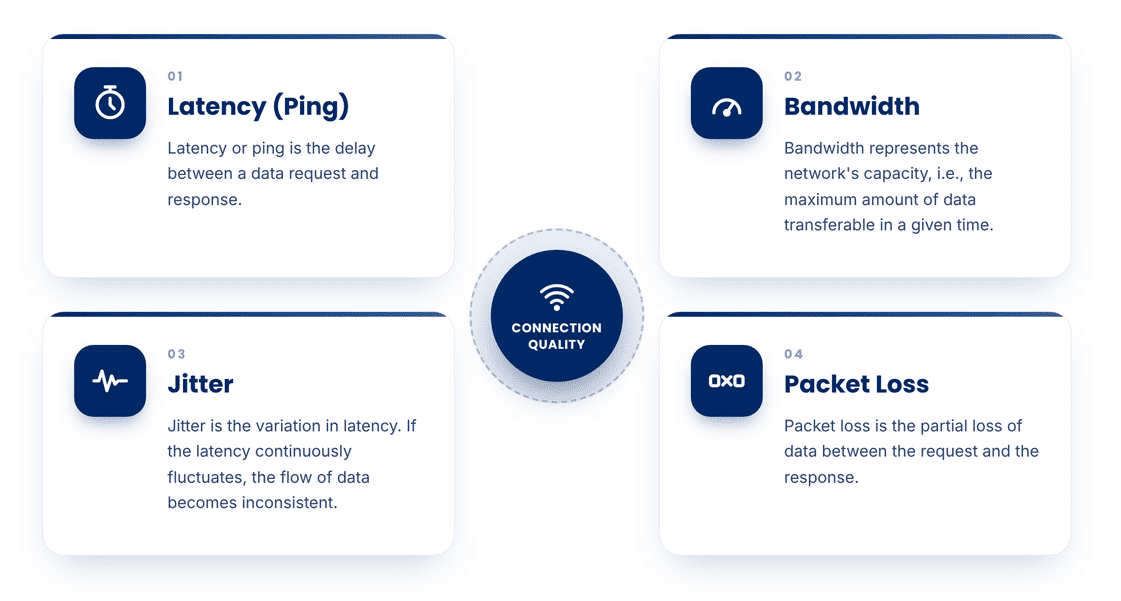

While you may not have control over your network’s bandwidth, you can take steps to reduce latency, jitter, and packet loss to improve your home internet’s performance.
How Satellite Internet Providers Reduce Latency
Thousands of kilometers between satellites in space and signal receivers on Earth are primarily responsible for the high-latency problem. Additionally, signals have to travel double the distance by going to the internet provider’s ground station and then back to space before returning to the user’s computing device.
Here’s how satellite internet providers have engineered the system to mitigate the latency issue:
Implementation of Laser Links
Modern LEO satellite internet providers such as Starlink have an extensive mesh network of smaller satellites in space. Thanks to this network, the data signals can skip the trip to the internet provider’s ground station. They simply hop onto a satellite that’s above the destination server and back, which reduces the time by several milliseconds.
TCP Acceleration
Traditional transmission control protocols (TCP) expect immediate response from a destination server, but high-latency satellite internet disrupts these protocols. Therefore, providers use "," where a ground station acts as a proxy server. This way, the data signals are tricked into bypassing the long round-trip across space.
How to Test & Lower Your Own Latency
You can easily test your internet connection’s latency or ping in seconds using any online speed test tool, including our own:
Quick Tips to Lower Your Latency
- Switch to Ethernet: Speeds over Wi-Fi are relatively lower and less consistent, which causes unnecessary jitter. Connecting your computing device directly to the router via an Ethernet cable provides a fast and stable connection whilst reducing ping.
- Reduce Network Congestion: When too many active devices are sharing a network, the bandwidth gets stretched out; this results in slower speeds and higher latency for everyone. Removing idle devices from the network frees up bandwidth and helps improve performance.
- Adjust Your Satellite Dish: Signal interference caused by vegetation, buildings, or other physical obstacles in your area can interrupt your connection and increase latency. Reposition your dish because a clear view of the sky is necessary to establish a strong connection.
FAQs
Why is satellite internet latency so high?
The main reason for satellite internet’s high latency is the prolonged distance data signals have to travel to establish a connection. Signals from an internet user travel to space and then to a ground station, and then again to space before returning to the user on the ground.
What is a good latency for satellite internet?
Typically, latency under 100ms is acceptable to carry out all kinds of online activities. While modern LEO satellites can offer latency between 25 – 60ms, the latency of traditional GEO satellites usually exceeds 600ms. Latency above 150ms becomes problematic for running real-time applications (gaming, video chats, etc.), but works fine for general use (light browsing, standard streaming, etc.)
Does Starlink have high latency?
Since Starlink utilizes advanced LEO satellite technology, its latency is much lower compared to traditional GEO-based satellite internet. The latency range (25 – 60ms) is close to what you can get with a cabled connection.
Is latency the same as internet speed?
No, internet latency and speed are not the same thing. Speed is a measure of how much data can be transferred or received per unit time, whereas latency is the delay between sending and receiving data from an external server.
What latency do I need for gaming/video calls?
Latency below 40ms is ideal for real-time activities like gaming and video calls, but up to 100ms is also acceptable.
Can you reduce satellite internet latency?
You can lower your satellite internet latency to some extent by switching to Ethernet, reducing traffic on your home network, and optimizing the placement of your satellite dish (signal receiver).


