
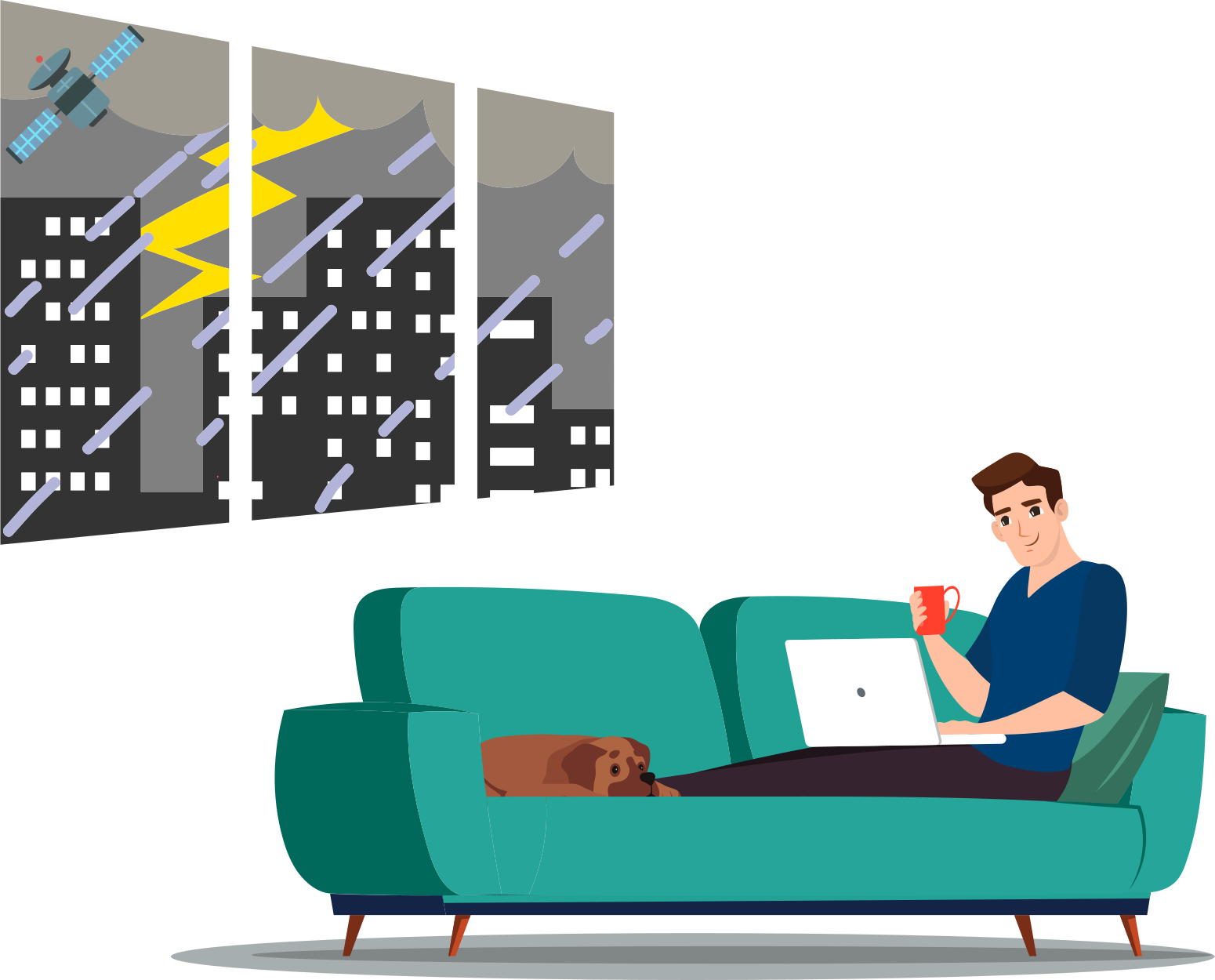
Satellite internet transfers data signals between the Earth and space using radio waves, which makes it highly susceptible to environmental factors including bad weather. A phenomenon called "rain fade" interferes with the broadcast of radio frequencies.
Rain fade occurs when data signals come into contact with ice, water, or strong winds; hence, signals get distorted, deflected, blocked, or absorbed during heavy rain, snowfall, dense fog, or storms. As a result, you may experience service interruptions or slowdowns.
Modern satellite networks like Starlink that utilize Low Earth Orbit (LEO) technology are less vulnerable to bad weather and recover faster than the traditional Geostationary (GEO) satellite networks like Hughesnet or Viasat.
Now let's discuss why this happens and what we can do to minimize the impact.
Why Weather Affects Satellite: Rain Fade & Band Physics
To understand why weather affects your satellite internet connection, you'll first have to comprehend how data signals travel between the satellite dish mounted on your home and the one in space.
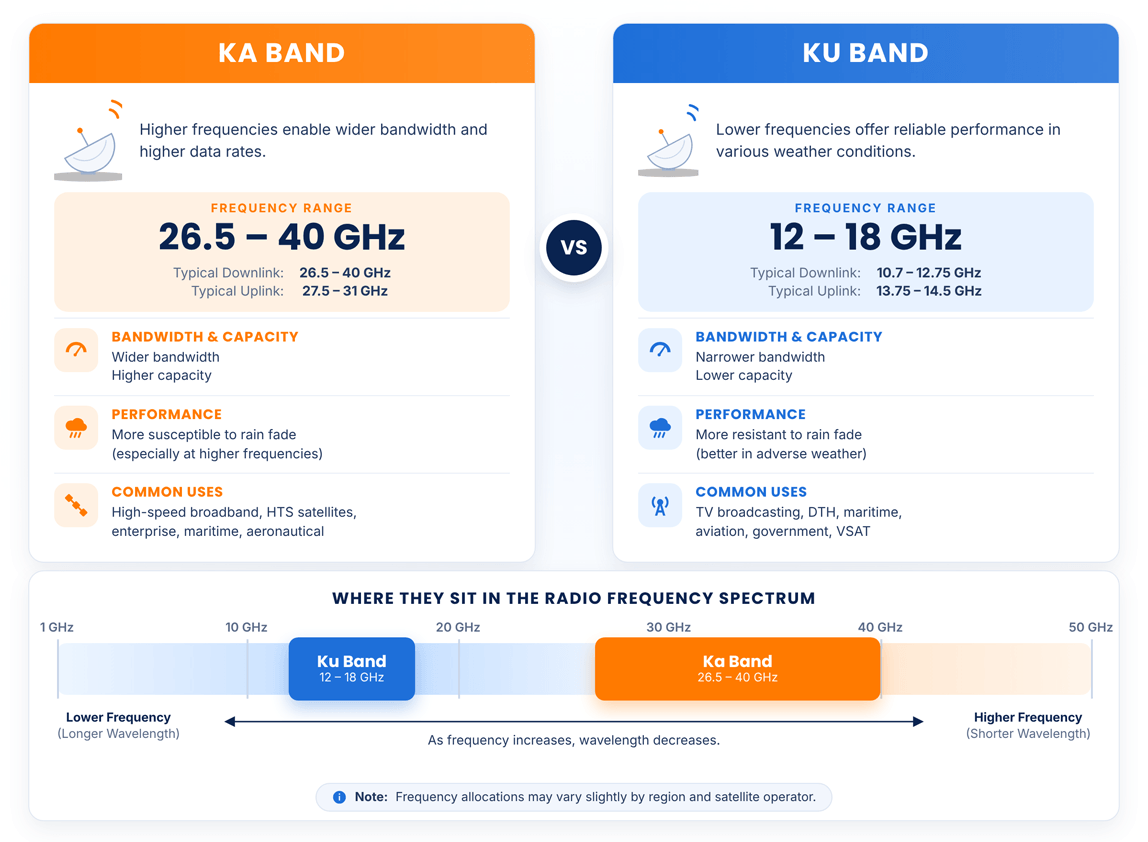
First off, satellites communicate via radio waves operating on specific frequency bands, primarily known as the Ku-band and Ka-band.
📡 Ku-Band
- Ku-band consists of lower-range frequencies (12 – 18 GHz), which have longer wavelengths. These frequencies have more reach (large coverage area) and are relatively resistant to rain fade.
🛰️ Ka-Band
- Ka-band consists of higher frequencies (27 – 40 GHz), which have shorter wavelengths. These frequencies are faster, but don’t reach too far; they are more vulnerable to rain fade.
During bad weather, data signals traveling between your dish and the satellite in space have to make it through thick clouds, water droplets, and/or ice. This is when rain fade is at play, and it weakens the signals; furthermore, the total distance to be travelled by the signal matters too.
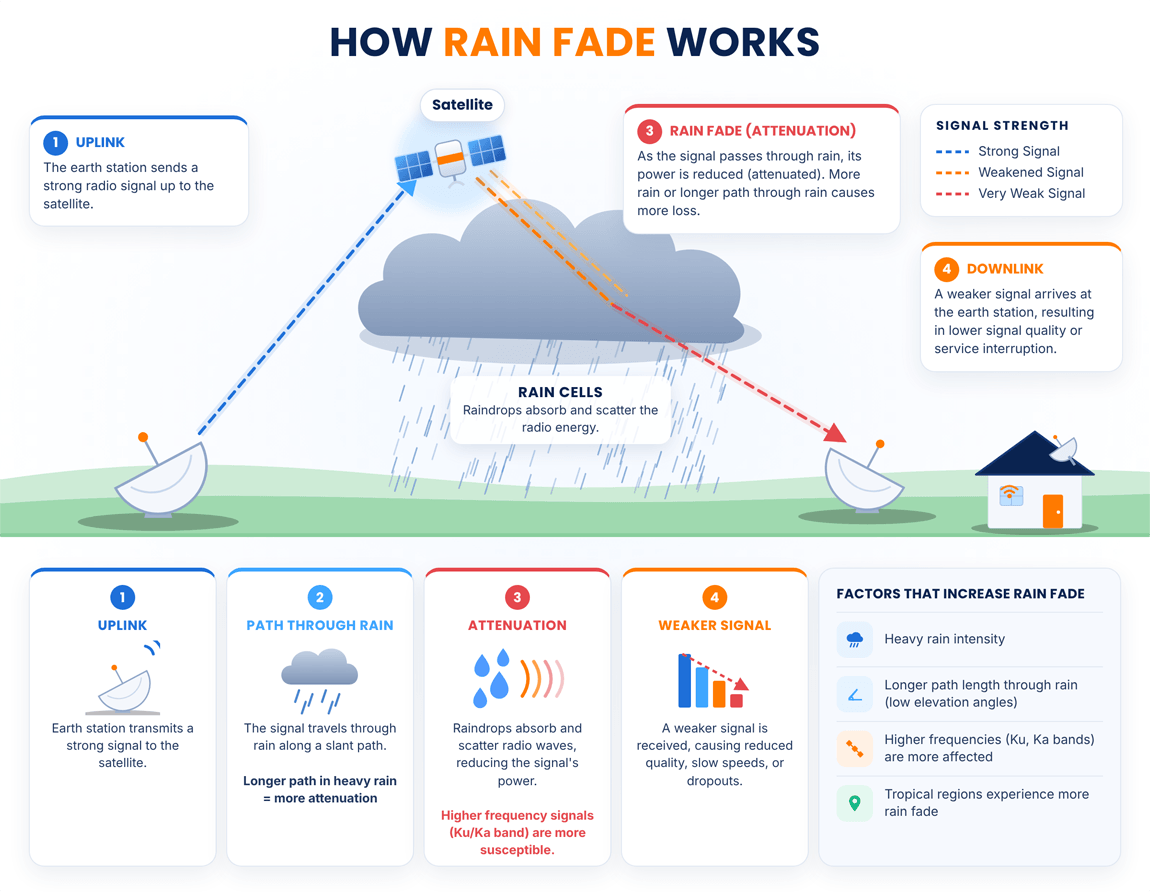
In case of GEO-based satellite service, signals have to travel between two fixed points; hence, any hindrance due to weather can partially or completely block the narrow line-of-sight. When this happens, you may encounter frequent disconnections or a long-lasting internet outage.
On the other hand, LEO-based satellite service does not rely on a single and stationary satellite in space. The constellation of mobile satellites allows an alternative pathway if one is obstructed because of rain fade. As a result, your connection recovers quickly, and you don't have to bear prolonged service loss.

Is your internet slow even when the skies are clear? Check for local network issues that you can fix on your own.
What to Expect by Weather Severity?
Bad weather has different levels of severity, which means the performance of your satellite internet varies accordingly:
| Weather Severity | Impact on Satellite Internet Performance |
|---|---|
| Light Rain or Drizzle | None to negligible |
| Moderate Rain | Mild signal interference may lower performance by 10 – 30% |
| Heavy Downpour or Thunderstorm | Noticeable rain fade; speeds may decrease by 50% or more due to weakened signal. |
| Light Snowfall | Negligible; quick recovery |
| Blizzard & Heavy Ice Buildup | Severe rain fade; temporary loss of connection or prolonged outage may occur. |
| Wind (up to 60 mph) | No effect unless wind is accompanied by rain or snow |
Rain & Thunderstorms Impact on Satellite Internet
While light or moderate rainfall may not significantly impact your satellite internet performance, heavy downpours accompanied by thunderstorms can cause severe rain fade. Raindrops have a higher density compared to other forms of precipitation, so a heavy shower can easily disperse or deflect signals.
Additionally, the wavelength of radio waves is similar to the size of water molecules, which enables raindrops to absorb signals. Lastly, lightning strikes from thunderstorms can cause electric interference and damage signal quality.
Snow & Ice Impact on Satellite Internet
The density of snow is lower than that of raindrops; thus, light snow or frost does not substantially impact your internet's performance. However, heavy snowfall can lead to thick ice deposits and condensation on satellite dishes, which may partially or entirely block signals.
Many modern satellite dishes come with built-in heaters to melt the snow buildup, which is quite effective for areas with an extremely cold climate. Even if you don't have a dish heater, you can manually remove accumulated ice; cleaning up the dish will help restore connectivity.
Wind, Fog, and Cloud Cover Impact
Light winds below 60mph do not noticeably affect satellite internet, but stronger winds or powerful windstorms can knock down/displace equipment. If your satellite dish is damaged or shifts out of place, it will lose a clear line-of-sight to the sky, resulting in loss of signals; sturdier mounting of the dish can help alleviate the issue.
Dense fog or cloud cover may absorb some signals, resulting in reduced bandwidth and speeds. While the effects of rain fade are perceptible, they are not as severe as with heavy rain or snowfall. Your internet will work fine as soon as the fog or clouds disperse.
Starlink vs. Hughesnet vs. Viasat in Bad Weather: Resilience Compared
The resilience of satellite internet service primarily depends upon the underlying technology. The difference in infrastructure between LEO and GEO satellite technology plays a huge role in weather tolerance.
Starlink (LEO)
Bands Used:
Combination of Ku-band and Ka-band frequencies to optimize network capacity and performance
Satellite Infrastructure:
Constellation of hundreds or thousands of low-orbit satellites between 100 – 1200 miles away
Weather Impact:
- Highly resistant to adverse weather conditions, but not entirely immune
- The availability of multiple mobile satellites allows signal propagation from different angles
- A localized bad weather episode is unlikely to completely shut down the connection, but temporary slowdowns are common
- If one signal path is compromised, the network promptly switches paths
- Built-in dish heaters prevent snow/ice buildup
Hughesnet & Viasat (GEO)
Bands Used:
Combination of Ku-band and Ka-band frequencies to optimize network capacity and performance
Satellite Infrastructure:
Single geostationary satellite positioned over 20,000 miles away
Weather Impact:
- The high altitude and fixed position of GEO satellites make the service more susceptible to rain fade.
- The narrow slant path between the dish on Earth and the satellite in space can easily be blocked without a way around.
- Recovery of your internet's performance depends on when the bad weather subsides, so longer downtimes are expected

Starlink takes home the title of the most resilient satellite internet provider
Power Outages: The Real Storm Risk
While rain fade is usually responsible for temporary internet slowdown or downtime, power outages caused by bad weather are the bigger problem. Electricity transformers are often damaged during severe storms, resulting in an indefinite power outage for the entire neighborhood.
Since your satellite dish and Wi-Fi equipment need electricity to operate, this means no internet access until the power is restored. Sometimes rain and thunderstorms can also cause power surges, which end up frying your equipment.
Here are two things to invest in if you want to save your equipment from lightning surges and maintain connectivity during a blackout:
Note: Internet equipment (modem and router) only consumes a small amount of electricity, so you don't need to purchase an expensive industrial-grade power generator to keep them running during a temporary outage.
How to Minimize Weather Disruptions: Actionable Checklist
You may not have control over the weather, but that does not mean you can't take steps to fortify your internet equipment and home setup. Here's what you can do to minimize the impact of bad weather on your satellite internet's performance:
- Mount your dish at an elevated spot so it has an unobstructed view of the sky; remove any vegetation or architectural overhangs coming in the way.
- Tightly secure your satellite dish so it doesn't sway or get displaced during a powerful storm; mount it on a sturdy surface with heavy-duty screws and fasteners.
- Connect your internet hardware to a reliable surge protector and add a battery backup to keep it up and running during power surges and outages.
- If your satellite dish accumulates ice/snow, clean it gently using a soft cloth or broom; do not use chemical cleaners or hot water.

Compare the best satellite internet options near you and fetch the one that best suits the weather patterns in your area.
FAQs
Does Starlink work in the rain?
Yes, Starlink Internet works fine during light or moderate rain, as there is no noticeable effect. However, a heavy downpour or severe thunderstorm may cause rain fade, which can lower performance temporarily due to signal loss.
Does satellite internet work in snow?
Falling snow can cause some signal interference, which temporarily lowers your internet's performance. However, heavy snowstorms may create thick ice deposits on your satellite dish that can entirely block signals.
What is rain fade?
Rain fade is the absorption, deflection, and scattering of high-frequency radio waves due to atmospheric moisture (i.e., rain, snow, fog, and cloud cover).
Does wind affect a satellite dish?
Light wind has negligible impact on satellite internet, but extremely strong winds can break down or displace hardware, resulting in a service outage.
Is Starlink or Hughesnet/Viasat better in bad weather?
Starlink is more resistant to bad weather as it relies on LEO satellite internet technology. Hughesnet and Viasat operate on GEO satellite technology, which makes their service highly susceptible to rain fade.
Will my satellite internet work during a power outage?
Yes, satellite internet will keep working during a power outage if your home network hardware (satellite dish, modem, and router) is connected to a UPS or battery backup.


