
A Virtual Private Network (VPN) allows users to mask their online activity, protect sensitive data, and access region-locked content. However, VPNs are known to slow down internet speeds, which makes you wonder if they will work with satellite internet?
Will a VPN Even Work on Satellite? (The CGNAT Catch)
The short answer is yes. Satellite internet works fine with modern outbound VPNs, i.e., where you connect to a commercial VPN using your phone or computing device. You can either set it up per-device or router-wide via bypass mode.
However, the unique architecture of satellite internet, particularly the Carrier-Grade Network Address Translation (CGNAT) system, leads to complications with inbound connections. Moreover, the high latency of Geostationary (GEO) satellite internet can make the VPN feel extra slow and laggy.
CGNAT Explained in Simple Words
Conventional broadband providers assign a unique public address to each home router, which is shared by all devices on the home network; this system is referred to as Regular NAT.
However, many modern internet service providers (ISPs) are employing CGNAT to conserve IPv4 addresses. This means that one IP address is shared by hundreds and thousands of customers.
Since your satellite internet does not provide you with a unique IP address, you can encounter authentication issues with inbound and . The other subscribers in your shared network pool may raise security concerns or make it look like multiple users from different locations are trying to log in at once.
To conclude, a standard outbound VPN will work fine if your main concern is privacy or streaming content on blocked sites. On the contrary, a personal or corporate VPN server (inbound) will shut you out because a shared IP flags you as suspicious.
Low Earth Orbit (LEO) satellite internet from Starlink offers low-latency internet comparable to what you get with conventional cable internet.
Therefore, VPNs do not significantly affect performance.

Method 1: Device-Level VPN
Using a device-level VPN is the easiest option and works best when you simply need privacy on a particular device, such as your personal laptop or smartphone.
Here’s how you enable a VPN on your device:
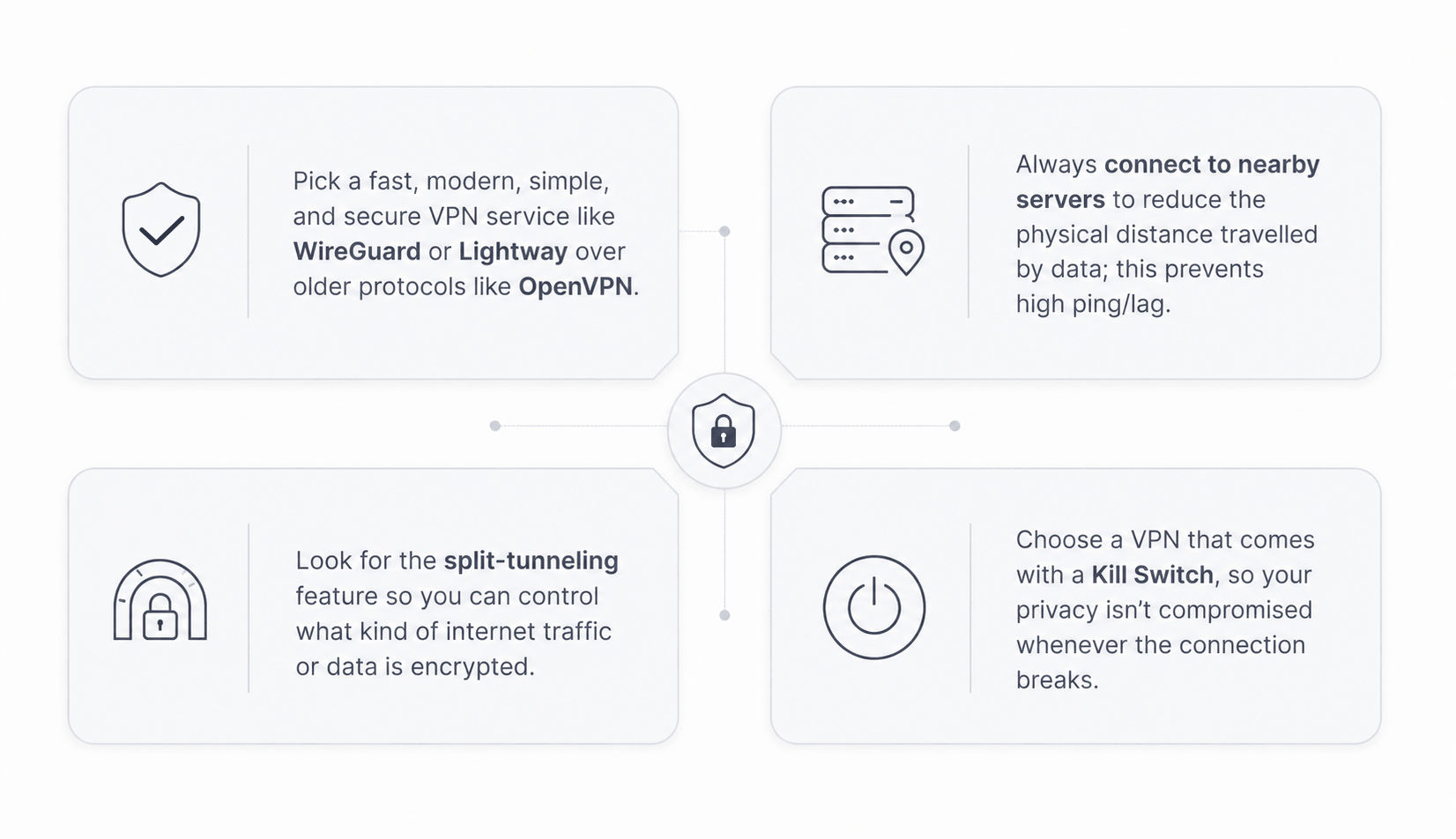
- Install a that features modern and lightweight protocols, as legacy VPNs add significant overhead that can make satellite internet feel too sluggish.
- Select a server that is geographically close to your current location because every extra mile travelled by your data adds to your connection’s base latency.
- Enable your so that if your connection fluctuates or drops, your internet is blocked until the VPN’s protection is restored; this prevents your true IP address from being exposed.
- Toggle on your VPN and test it for its intended purpose. If it does not help you unblock your desired content or the performance is pathetic, look for an alternative and repeat the first three steps.
Method 2: Router-Level VPN
A router-level VPN encrypts all the data passing through your home network, so every connected device is protected. However, ISP-provided routers do not support VPN integration, so you’ll have to bypass the default settings.
- Log into your ISP’s mobile app, navigate to Settings, and enable "Bypass Mode" to disable the router’s built-in routing functions.
- Using an Ethernet adapter, connect your VPN-enabled router's WAN port to a LAN port on your ISP router.
- Open your new router’s admin interface and configure your “VPN Client”. The setup instructions can be obtained from the VPN service provider; it typically involves importing configuration files.
- Once the VPN is configured and active, check your IP address from a platform like to confirm that it works.

Need help choosing a new router for your home network?
The CGNAT Problem & Hosting Your Own Server
To understand the CGNAT problem, think of your satellite internet connection as living in a large apartment complex. Even though you have a permanent street address, your personal apartment does not have an individual identity.
Now imagine an old family friend trying to locate you without knowing your apartment/unit number. They arrive at the building lobby, but fail to reach you because they cannot distinguish your apartment from a hundred identical units in the building.
This is what happens when the internet views your device that’s connected to a shared network. Fortunately, it doesn’t affect common outbound connections like browsing, banking, and streaming, but problems arise when you try to establish an inbound connection.
For example, if you want to access your home’s security cameras while travelling, CGNAT won’t let you access the home server because your device is connected to a different network. Since your home network has no public IP, standard fails.
What to Look for in a VPN for Satellite Internet
A VPN that prioritizes your online safety and doesn’t noticeably slow down your online applications is the dream. Choosing a capable VPN service is the key, so here are some tips and features to look out for:
VPNs on Hughesnet & Viasat (GEO Satellite Internet): What to Expect
If you are subscribed to a GEO satellite internet provider like Hughesnet or Viasat, you’re already dealing with high-latency internet, and perhaps slow speeds too. To be honest, adding a VPN to the equation isn’t going to improve the situation.
Legacy VPN services like OpenVPN can increase your satellite internet latency by 50 – 250ms; this means if the base latency is roughly 600ms, it may exceed 800ms when using the VPN. Moreover, encryption overhead via a VPN can reduce download speeds by 10 – 50%.
Here’s what you can expect when latency shoots up and speeds are significantly reduced:
- Websites may take longer to load, and downloads can take forever.
- It becomes impossible to conduct any real-time or high-bandwidth activities.
- Many applications time out and never fully load.
- Videos keep buffering unless you switch to a low resolution.
Troubleshooting Common VPN Issues
| Issue | Likely Cause | Suggested Fix |
|---|---|---|
| VPN won’t connect | Incorrect credentials or firewall | Verify your login information and temporarily disable any network firewall/anti-virus program. |
| Connection drops on handoff. | Unstable internet connection or network switch (Wi-Fi to mobile data or vice versa) | Switch to Ethernet and enable the “Kill Switch” feature to protect your privacy until the VPN connection is restored. |
| Speeds become too slow. | Distant or overcrowded server | Switch to a geographically closer or less crowded server |
| Geo-Block | Your actual IP address is detected and flagged | Try reconnecting with a different server or use another VPN service |
Does your internet feel sluggish even when you’re not using a VPN?
Find Out What Could Be Slowing Down Your Internet and How You Can Fix It.

FAQs
Does a VPN work on Starlink/satellite internet?
Yes, most commercial VPNs work with Starlink and other satellite internet services; however, performance varies by VPN provider and protocols.
Why won't my VPN connect on Starlink?
The selected VPN may not be working due to a network firewall or other service incompatibility issues. Try disabling your firewall or using an alternative VPN service.
Can I host my own VPN server on Starlink? (CGNAT)
By default, you cannot host your own VPN server on Starlink due to the CGNAT system. However, it can be possible by changing your Starlink router settings to “Bypass Mode” and connecting a VPN-enabled third-party router.
What's the best VPN protocol for satellite internet?
WireGuard is the best VPN protocol for satellite internet, thanks to its fast, modern, and lightweight architecture.
How much does a VPN slow down Starlink?
A VPN can slow down your Starlink internet speeds by 10 – 50%.
Does a VPN work on Hughesnet or Viasat?
Technically, VPNs can work with GEO satellite internet from providers like Hughesnet or Viasat, but the resulting performance tends to be questionable. The latency overhead and speed reduction can make the connection frustratingly slow.
Do I need a special router to run a VPN on Starlink?
You do not need a special router to use any device-level VPN with Starlink, but a third-party router with support for “VPN Client” is required for router-level VPN.


