

Geostationary Earth Orbit (GEO) satellite internet technology represents the traditional satellite internet from providers like Hughesnet and Viasat. Later on, Starlink emerged with Low Earth Orbit (LEO) satellite internet technology, which has transformed the rural connectivity scene.
GEO-based satellite internet relies on a single massive satellite in space, which occupies a fixed position over 20,000 miles above the Earth. The extensive distance means that data signals have to travel a long path, and that results in high latency (~600ms).
LEO-based satellite internet utilizes thousands of smaller mobile satellites that form a constellation. These satellites are located only 160 – 1200 miles above the Earth, which significantly reduces the distance to be travelled by data signals; as a result, latency is lowered to 25 – 60ms.
Both GEO and LEO satellite internet services are popular across rural and remote regions that lack access to wired broadband. Now let’s explore both technologies in detail, so you can pick the one that best suits your needs and preferences.
GEO vs. LEO at a Glance
| GEO Satellite Internet | LEO Satellite Internet | |
|---|---|---|
| Altitude (Distance from Earth) | 20,000+ miles (approximately 36,000km) | 160 – 1,200 miles (250 – 2,000km) |
| Infrastructure | One or a few big stationary satellites (per provider) operating individually | Network of hundreds or thousands of small mobile satellites |
| Average Latency (Ping) | 600ms+ | 25 – 60ms |
| Typical Download Speeds | 25 – 150 Mbps | 50 – 300 Mbps |
| Best For | Light internet usage (general browsing, emails, casual streaming) | Heavy internet usage and real-time applications (Zoom calls, gaming, 4K streaming) |
| Primary Providers | Hughesnet & Viasat | Starlink |
What is GEO Satellite Internet?
The legacy GEO satellite internet is known for its high latency and widespread coverage. GEO satellites are located nearly 36,000km above the Earth, and they rotate at the same speed as Earth, which makes them appear stationary.
One GEO satellite can cover about one-third of the Earth, and a few of them are enough to provide global coverage. To understand the performance of GEO satellite internet, it’s important to know how it works.
How GEO Works
Ever wondered why the latency of traditional satellite internet is so high? The reason lies in the path taken by data signals to connect you to the internet.
Here’s how it works:
- The user sends a data request from their computing device.
- The router forwards the data signals to the satellite dish mounted on the user’s property.
- The satellite dish uses high-frequency radio waves to transfer the signals to the GEO satellite in space.
- The GEO satellites amplify and redirect the signals to a designated ground station belonging to your internet service provider (ISP).
- The ground station locates the destination server and downloads the requested information.
- The response data signals take the same route as the request data signals: from the ground station to the GEO satellite, and back to the satellite dish connected to your router.
- The router translates the signals into data you can easily interpret on your computing device.
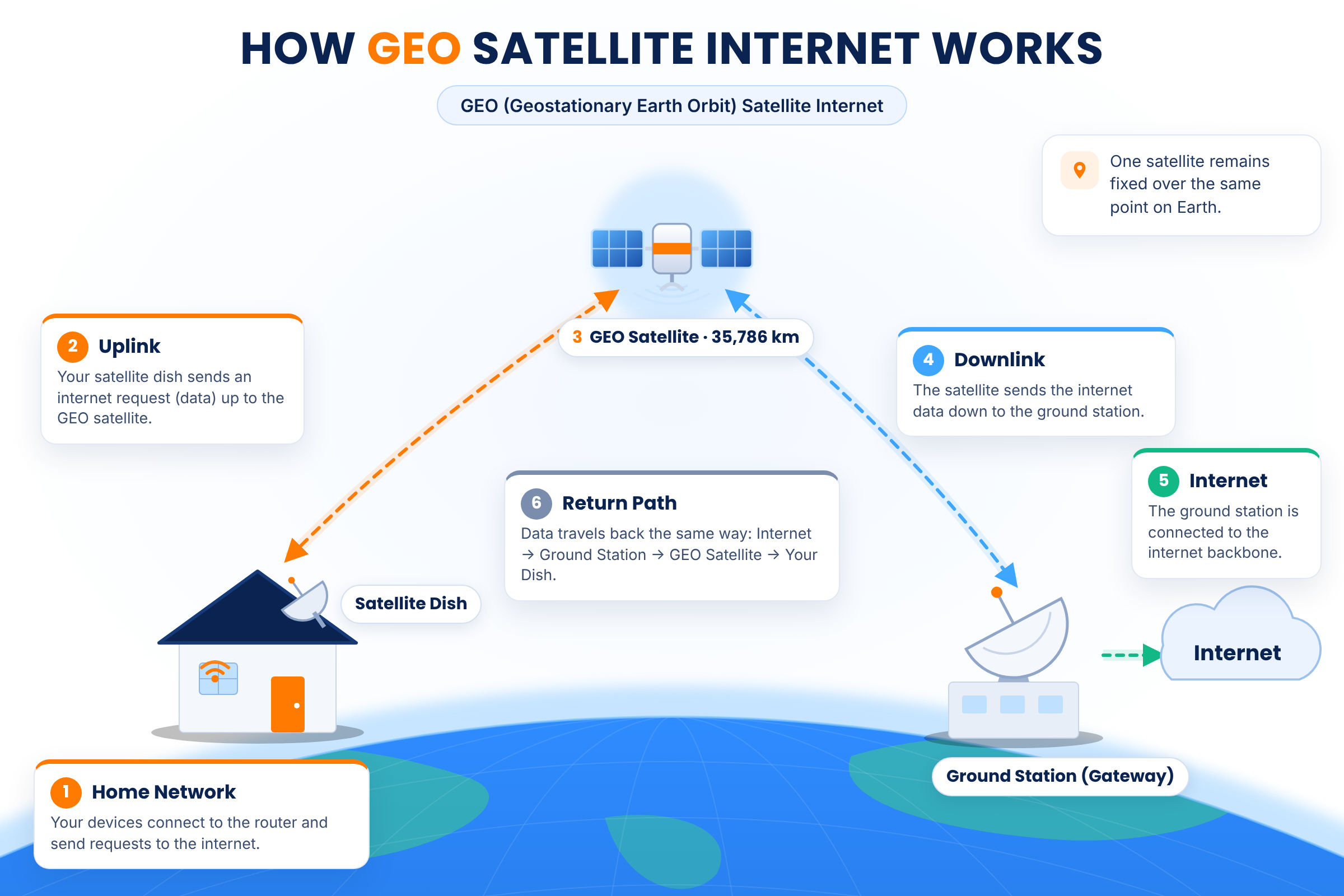
The round trip travelled by the data signals means double the distance between the Earth and the GEO satellite in space; this explains the prolonged time lapse between request and response, which leads to high ping or latency.
Pros & Cons of GEO Satellite Internet
👍 PROS:
- Available everywhere (ideal for areas that lack access to conventional broadband services)
- Suitable for light internet usage
- Entry-level plans are budget-friendly
- Most providers offer equipment on lease
👎 CONS:
- High latency (~600ms)
- Strict high-speed/priority data caps
- Highly susceptible to network congestion
- Prone to signal interference from bad weather, physical obstructions, etc.
Compare Hughesnet and Viasat Internet Plans Side-by- Side

What is LEO Satellite Internet?
LEO satellite technology breaks stereotypes by providing fast, low-latency internet that’s comparable to terrestrial broadband services. LEO satellites are smaller in size, and they are located much closer to Earth, i.e., less than 2000km.
LEO satellites have a relatively small coverage area, so they operate in clusters rather than singlehandedly like GEO satellites. LEO networks, also known as constellations, consist of hundreds or thousands of mobile satellites communicating with each other.
How Constellations and Handoffs Work
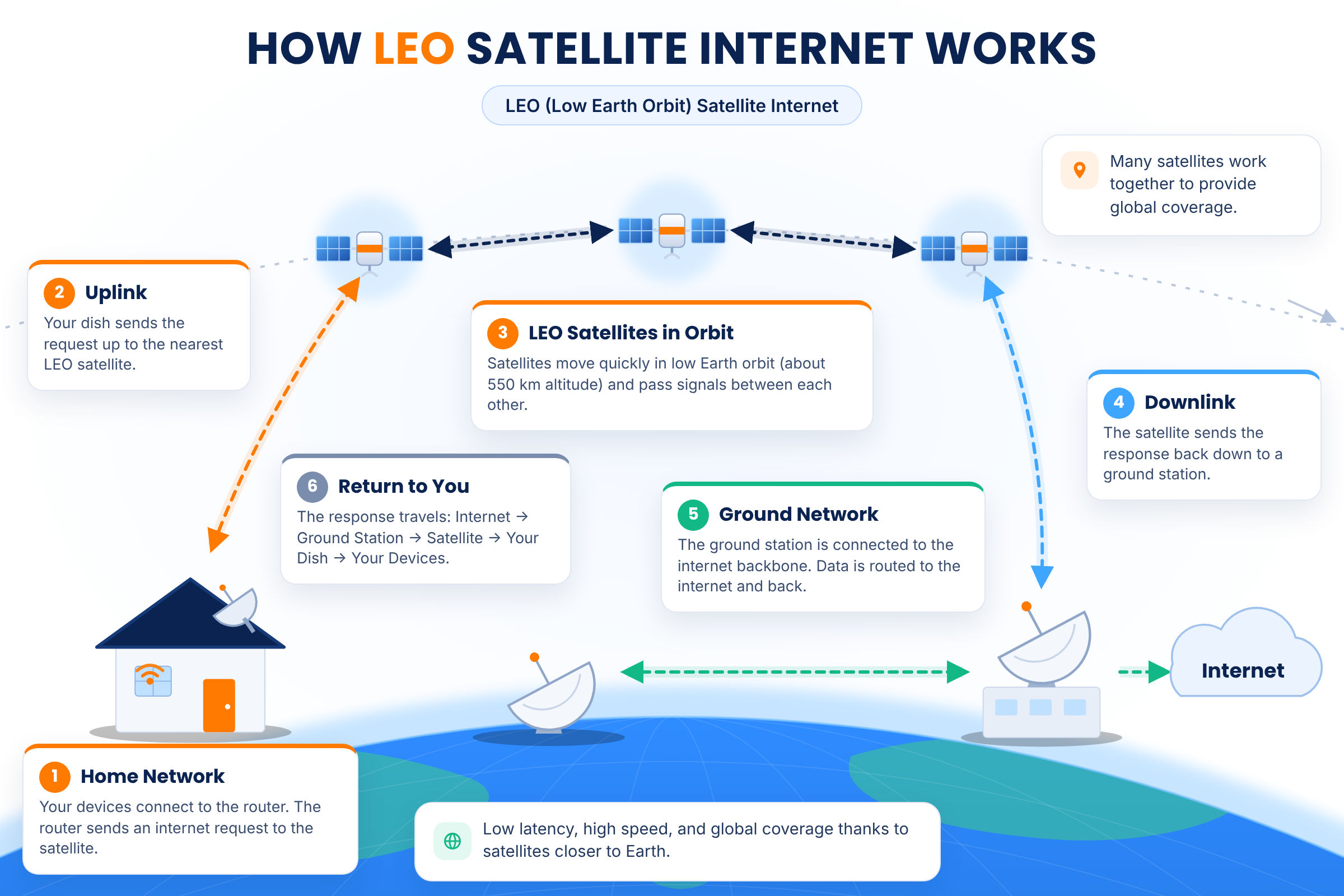
LEO satellite internet works in a similar fashion to GEO satellite internet, but the difference lies in the path taken and total distance travelled by data signals. Since LEO satellites exist much closer to the Earth, signals from your satellite dish can reach them quickly.
Once the signals have reached space, they travel along several LEO satellites until they reach one that is right above the ground station. This way the overall path is shortened, and the round trip is completed more quickly; thus, the delay between data request and response is minimized.
Pros & Cons of LEO Satellite Internet
👍 PROS:
- Widespread availability
- Low latency
- Truly unlimited data (no high-speed data caps)
- Higher speed threshold compared to GEO
👎 CONS:
- Speeds may slow down during rush hours due to network congestion
- Relatively expensive (high upfront costs)
- Sensitivity to weather (rain fade)

Convinced to sign up for LEO satellite internet already?
GEO vs. LEO Latency
Latency is the key factor that distinguishes LEO from GEO satellite internet in terms of performance. The latency or ping of your connection is the round-trip time (RTT) for a data packet to travel from your computer to the satellite in space, down to a ground station, across the terrestrial network, and back.
Let’s find out how the distance travelled by a data packet determines the latency of GEO vs. LEO satellite internet:
The Speed-of-Light Math
Speed of light = 300,000 km/s
Distance travelled by a data packet (GEO) = 36,000km x 4 = 144,000km
Latency = Total distance travelled by the data packet ÷ Speed of light
GEO satellite internet’s latency would be roughly 480ms if the data packet travelled through a vacuum. However, real-world conditions include routing overhead, terrestrial backhaul, hardware processing, and other environmental interference, so the resulting ping is around 600–700ms.
Now, in the case of LEO satellite technology, the data packet travels roughly 250 – 2000km from your device to the satellite in space. Assuming that the distance is around 1000km, let’s do the math:
Distance travelled by a data packet (LEO) = 1000km x 4 = 4,000km
Latency = Total distance travelled by the data packet ÷ Speed of light
A ping of 10ms is what you could expect under ideal conditions (vacuum); lower if the total distance travelled by the data packet was shorter. Once again, real-world conditions contribute to delays and the actual latency falls within the 25 – 60ms range.
Speed, Data Caps & Weather Impact Compared
GEO (Hughesnet, Viasat)
Download & Upload Speeds:
Hughesnet’s download speeds max out at 100 Mbps, and upload speeds normally go as far as 5 Mbps only.
Viasat can offer download speeds up to 150 Mbps with its premium plan, whereas upload speeds are the same as with Hughesnet (3 – 5 Mbps on average).
Data Caps & Policies:
Hughesnet and Viasat impose strict high-speed or priority data caps, typically ranging between 10 – 200 GB. Viasat Unleashed (premium plan) offers a soft data cap of 850 GB.
If you consume all your high-speed data before the end of the billing cycle, you will be shifted to standard data (speeds of 1 – 3 Mbps).
One thing GEO providers have in common is that they do not charge overage fees or suspend service if you exceed your priority data cap.
Weather Sensitivity:
GEO-based satellite internet is highly susceptible to weather interference. Signals are easily blocked, deflected, or absorbed due to a phenomenon called rain fade.
Snow or ice deposits on your satellite dish may significantly lower signal quality or lead to a temporary outage.
LEO (Starlink)
Download & Upload Speeds:
Starlink’s entry-level plan offers download speeds up to 100 Mbps and upload speeds up to 35Mbps.
Starlink’s highest-tier residential internet plan can achieve download speeds up to 320 Mbps and upload speeds up to 40 Mbps.
Data Caps & Policies:
Starlink does not have any high-speed or priority data caps. No matter what plan you choose, you can enjoy unlimited data and the best speeds the entire month.
The only time you may experience slightly slower speeds is during peak usage hours (6 – 11 PM) when maximum users are online.
Users with excessive data consumption may face deprioritization during network congestion, as per Starlink’s Fair Use Policy (FUP).
Weather Sensitivity:
Modern LEO-based satellite dishes are designed for better resistance against harsh weather conditions; moreover, they are portable and easy to clean.
While your connection is still affected by rain fade, the recovery time is relatively low due to the shorter distance between your satellite dish and the LEO satellite in space.
GEO vs. LEO: Which is Right for You?
At the end of the day, choosing between GEO and LEO satellite internet may come down to what’s easily available or affordable. However, when you have both options, you must understand your speed and data requirements to pick the right provider and plan.
| User Persona | Recommended Choice | Reason |
|---|---|---|
| Online Gamer or Remote Worker | LEO (Starlink) | Real-time applications like Zoom meetings for work and multiplayer gaming require low-latency internet for a smooth experience. |
| Light Internet User (general web browsing, emails, texting, etc.) | GEO (Hughesnet or Viasat) | GEO-based internet service costs less and is suitable for basic connectivity. |
| Budget Conscious/Low-Income User | GEO (Hughesnet) | If low cost is your top priority, Hughesnet’s entry-level plan is the most budget-friendly option. |
| Heavy Streamer | LEO (Starlink) or GEO (Viasat Unleashed) | Starlink offers the highest speeds and unlimited data to seamlessly support HD and 4K streaming. Users who don’t have Starlink service in their area may consider Viasat Unleashed (premium GEO plan) |
Satellite internet is typically considered when wired broadband is unavailable. Therefore, check out your options before you seal the deal!

Bonus Section: LEO vs. MEO vs. GEO
Multiple kinds of satellites orbit our Earth in space. The orbits are classified into three categories, namely Low Earth Orbit (LEO), Medium Earth Orbit (MEO), and Geostationary Earth Orbit (GEO). Each orbit supports various telecommunication systems on Earth.
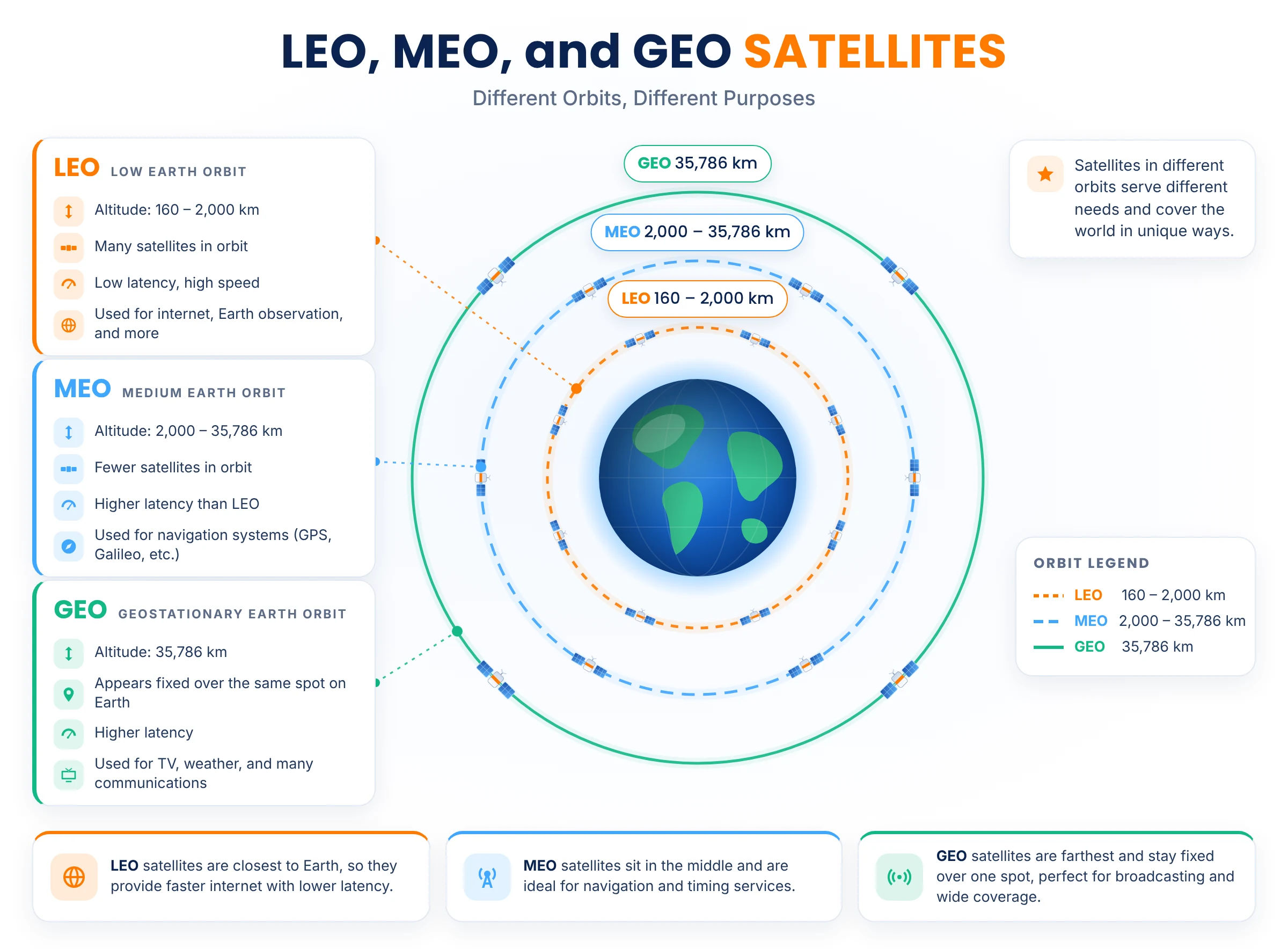
- LEO Orbit: These satellites are closest to Earth, making them ideal for low-latency broadband and mobile communication. They are also used for capturing high-resolution images of the Earth’s surface, which are useful in weather forecasting and disaster management.
- MEO Orbit: These satellites exist in the middle (between 2000 – 36000km above the Earth) and are mainly used for navigation, i.e., they support Global Positioning Systems (GPS)
- GEO Orbit: These satellites cover the largest area on Earth, forming the backbone of satellite television and radio broadcasting.
FAQs
Is LEO better than GEO for internet?
Yes, LEO satellite technology is better for internet as the shorter distance from Earth helps reduce latency (ping) and signal interference issues.
Why is GEO satellite internet so slow/laggy?
With GEO-based satellite internet, data packets have to travel long distances, which causes a significant delay between data request and response; as a result, the RTT or ping is high, so the internet feels slow or laggy.
Is Starlink LEO or GEO?
Starlink is the leading LEO satellite internet provider right now. It relies on a constellation of thousands of LEO satellites in space to provide fast, low-latency internet.
Can you game on GEO satellite internet?
Casual gaming in low resolution is doable with GEO satellite internet, but it is not recommended. Competitive or hardcore gaming can be impossible because of the high ping and limited speeds.
Do LEO satellites work in bad weather?
Compared to GEO, LEO satellites are generally more resistant to bad weather conditions. Nonetheless, rain fade can still degrade signals and negatively impact connection quality.
How many satellites does each orbit type need?
The GEO orbit requires about three satellites for global coverage, whereas the LEO orbit needs hundreds or thousands of them. The MEO orbit takes the middle ground with roughly 24 – 30 satellites.
Will Amazon Leo (Kuiper) be LEO like Starlink?
Yes, Amazon's Project Kuiper (marketed as Amazon Leo) constitutes a LEO satellite network that will function in the same way as Starlink.
Is GEO satellite internet ever the better choice?
LEO satellite internet is always the better choice performance-wise, but GEO can be a reasonable choice if you’re looking for the cheapest broadband option in a rural/remote area.


