
Xfinity Bill Payment Guide: All Ways to Pay

The panic is real when a bill is due soon, and you can’t figure out a way to pay. If you’re someone who likes options, Xfinity’s got your back with multiple payment methods.
Xfinity bill payment can be done online through the website or app, in-person at an Xfinity store, or via phone without logging into your Xfinity account. Eligible payment options include credit/debit card, bank transfer, and cash, so you’ve got this!
Maximize your savings by subscribing to an Xfinity Bundle – combine your Internet plan with TV, Mobile, Home Phone, and/or Home Security services today.
Explore the Best Bundle Deals

In case one approach doesn’t work, you can always try an alternative. Now let’s break down each method and pay that Xfinity bill before time runs out.
How to Pay Your Xfinity Bill
Xfinity online bill payment is convenient for most users, but other options exist. Here’s an overview of various payment methods that may come in handy in different situations:
- Online (website/app) – requires account login and payment via credit card, debit card, or Apple Pay
- AutoPay – set it up via the Xfinity mobile app for secure and automatic payments
- Phone – call 1-800-XFINITY and follow instructions to pay bill via debit/credit card or ACH transfer
- In-store – visit your nearest Xfinity Retail Store to pay with cash, check, or card
- Mail – pay the bill by sending a check or money order

Confused by your internet bill? Check out our complete guide on those mysterious charges!
Hidden Internet Fees to Watch Out for in Bills
Pay Xfinity Bill Online
Paying your Xfinity bill online is the primary method, and you can submit a one-time payment using a credit/debit card or bank account. Accepted credit or debit cards include American Express, Discover, Mastercard, and Visa.
Follow these steps to pay your Xfinity bill online:
- Open the Xfinity app or website and log in to your account; you can use your primary or manager Xfinity ID and password.
- Select Billing & Pay from the top menu.
- Select Make a Payment from the drop-down menu.
- Under Payment Amount, select Current balance or Pay another amount (and enter the payable amount).
- Change the payment date if you want to schedule your payment for later.
- Choose your payment method and provide details of your debit/credit card or bank account if not previously saved.
- Once you’ve been navigated to the Review your payment screen, click or tap on Submit Payment to complete the task.
- You may turn on automatic payments if you’ve saved a payment method; this way, you won’t have to manually submit your bill next time.
How to Pay Xfinity Bill Without Logging In
Xfinity Mobile users can use “Quick Pay” to make a quick one-time payment. This method does not require logging into your Xfinity account, so it’s super useful if you want someone else to pay the bill on your behalf without gaining access to your account; it also comes in handy when you’re having trouble signing in.
To pay your bill via Quick Pay, you’ll need the following:
- An active Xfinity Mobile phone number
- Zip code of your service address
- Credit/debit card
Step-by-step procedure:
- Open the Quick Pay account lookup page.
- Enter your valid Xfinity Mobile phone number and the ZIP code of your service address.
- Specify the payment amount.
- Provide required payment information; include email address if you want to receive a payment receipt.
- Click or tap Submit.
P.S. In case someone else is paying your Xfinity bill, a confirmation message will be sent to your primary email address.
Xfinity Internet Customers stay connected on the go with millions of FREE Wi-Fi Hotspots! LEARN MORE

Xfinity AutoPay Setup (Best Option)
If you’re a busy bee who often forgets to pay your bills on time, Xfinity AutoPay can offer you much convenience and peace of mind. When you enable automatic payment, your bill will be charged every month on the due date using your saved payment method.
Steps to Enable AutoPay:
- Sign in to your Xfinity account
- Go to Billing & Pay
- Select Manage AutoPay
Xfinity Mobile users have to navigate to View Bill & Transaction History and select Bill Details in the Mobile Billing card.
- Choose a saved payment method or add a new one
- Check the terms & conditions box
- Enter your payment details/security code for credit/debit card or bank account
- Click or tap Set Up
- Wait for the confirmation message and email
Benefits of Enabling AutoPay
- Automatic, timely billing (no missed payments or late fees)
- No manual intervention required to pay the bill
- No need to remember passwords and due dates
- Automatic payments and paperless billing earn you a $10 discount on your monthly bill
Pay Xfinity Bill by Phone
Another way to pay your Xfinity bill without an internet connection or signing into your account is by phone. All you have to do is dial 1-800-XFINITY (1-800-934-6489) and let the automated prompts guide you through the process.
Payment via phone is made using an American Express, Discover, Mastercard, or Visa credit or debit card. An ACH transfer from a valid savings or checking account with a U.S. bank is eligible as well. Therefore, ensure you have complete details of your chosen payment method while you make the call.
How to Pay Xfinity Bill in Person
Many people prefer to pay their bills in person, especially on the occasion of “first payments” with a business. Moreover, some consumers do not trust online transactions and find comfort in communicating with a real person where money is involved; if that sounds relatable, there’s good news for you.
You can visit any Xfinity retail store or self-service station in your area to pay your bill in person. Aside from using debit/credit cards and bank transfer, you have the option to pay in cash or use a traveler’s check, too.
P.S. You can also pay your Xfinity bill by money order at a Western Union Quick Collect location.
Xfinity Late Fees & Due Dates
At times, we forget to pay our bills on time; when a lot is going on, some things can slip our minds. If you don’t pay your Xfinity bill by the due date, you will receive a late payment notification. This may lead to a surcharge on your next bill, but that’s not the end of it.
Xfinity understands that a late payment can be unintentional, which is why it offers a chance to redeem yourself. When you clear your past due balance and enable automatic payments for future bills, you receive a credit to cover the previously incurred late fee – how awesome is that?
Service Suspension
A late or missed payment may interrupt or disconnect your service; if this happens, a reactivation fee may apply. Once you’ve paid off the late payment fee and reactivation charge, your service will be restored within 2-3 days.
Grace Period & Late Fee Amount
Xfinity’s grace period and late fee amount vary by type of service and may depend on your location, billing cycle, and account history. For example, the late payment fee for Xfinity Internet is about $13, and customers with a decent billing record can expect a grace period of 7 – 10 days.
What to Do If You Can't Pay Your Xfinity Bill
In case you cannot pay your Xfinity bill by the due date because of financial reasons, you may consider the following solutions:
1- Payment Extensions
Xfinity’s “payment arrangement” option lets you choose a date to pay your past-due balance and avoid service interruption. You may log in to your account to check eligibility for flexible payment options; if yes, you’ll see the following message:
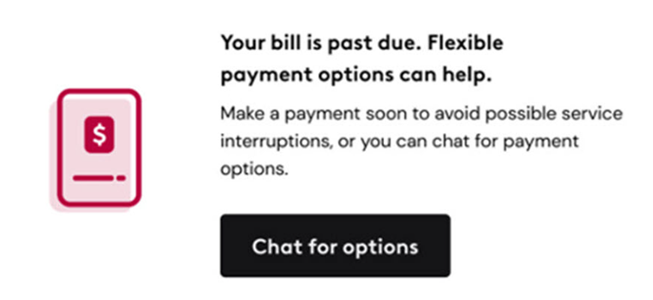
When you tap or click on “chat for options,” Xfinity Assistant will guide you further and let you pick a date; you can choose a payment method later. In case you already have a scheduled payment, you’ll need to cancel or pay it off to avoid double payment later.
2- Assistance Programs
Xfinity Internet customers who have a past-due balance may qualify for a bill assistance plan. This plan offers a discount on your monthly bill for up to six months. If you’re eligible, Xfinity Assistant will navigate you to the plan summary along with terms and conditions.
3- Downgrading Plan
In a situation where you’re not sure if you can afford the service for the long term, consider downgrading to a cheaper plan. You can contact Xfinity customer service and ask about more budget-friendly options; if a cheaper plan isn’t available, you can try negotiating for a better price.
4- Switching Providers
The last resort to get out of an awful debt situation is to switch providers. Explore other internet services available in your area and choose one that better suits your budget. Look for promo offers that can score you a hefty discount for 12 months or more.

Do you think it’s time to switch to a different and possibly cheaper internet provider? Explore Affordable Internet Options Near You
Are You Overpaying for Xfinity? (Money Section)
Surveys suggest that 80% of Americans are overpaying for internet, so you might be onto something if your Xfinity Internet bill seems over the top. The primary reason behind this is that most consumers don’t understand how the internet works, which results in choosing the wrong plan.
If you want an internet plan that best suits your needs and budget, start by understanding your speed and data requirements.
Compare Xfinity with top providers in your area to discover money-saving opportunities.
Use Our FREE Provider Comparison Tool to Assess the Best Deals Side by Side

Frequently Asked Questions
Can I pay the Xfinity bill without signing in?
Yes, you can pay your Xfinity bill without signing into your account by using the following options:
- Pay by phone (Call 1-800-XFINITY)
- Use Quick Pay
Does Xfinity charge late fees?
Xfinity may charge a late fee if you don’t submit your payment by the due date; the amount of the late fee and eligibility for a grace period vary by service and billing history.
What happens if I miss an Xfinity payment?
Missing an Xfinity bill payment may result in a late fee, loss of autopay discount, or temporary service suspension.
Can I change my due date for Xfinity bill payment?
Yes, Xfinity does allow customers to move their due date as long as it’s not their first bill payment; unfortunately, this offer is not available to Xfinity Mobile customers for now.
Table of content
- How to Pay Your Xfinity Bill
- Pay Xfinity Bill Online
- How to Pay Xfinity Bill Without Logging In
- Xfinity AutoPay Setup
- Pay Xfinity Bill by Phone
- How to Pay Xfinity Bill in Person
- Xfinity Late Fees & Due Dates
- What to Do If You Can't Pay Your Xfinity Bill
- Are You Overpaying for Xfinity?
- Frequently Asked Questions


