

Ever wondered why a 100 Mbps internet connection doesn’t download a 100 MB file in a second? The answer lies in one tiny detail: bits vs bytes.
Also, Mbps and MBps are not the same.
Internet providers usually mention speeds in Mbps, which translates to megabits per second. Megabits (mb) are typically used to measure network bandwidth or throughput, whereas megabytes (MB) are the standard unit for storage in the RAM, HDD, SSD, etc., of our computing devices.
Still confused? Read on for a simple and comprehensive explanation from A to Z.

Wish to speed up downloads and uploads?
Switch to fiber internet for faster symmetrical speeds.
What Is a Bit?
A bit is the short form of “binary digit” and can be defined as the smallest unit of digital data.
Computers use binary language, and everything in binary is represented with the digits 0 and 1. Since a bit is the smallest building block of all computing and digital communications systems, its value is either 0 or 1.
Bit Rate for Data Transfer
Whenever data is transferred over a network, we measure the bit rate, which is the amount of data processed per second. The bit rate can be written as bits per second (bps), kilobits per second (kbps), megabits per second (Mbps), or gigabits per second (Gbps).
Bits are the preferred unit for measuring data transfer rate or internet speed because they simplify data flow. Modern internet plans typically use Mbps and Gbps to represent speeds.
What Is a Byte?
A byte is a bigger unit of digital data and comprises 8 bits.
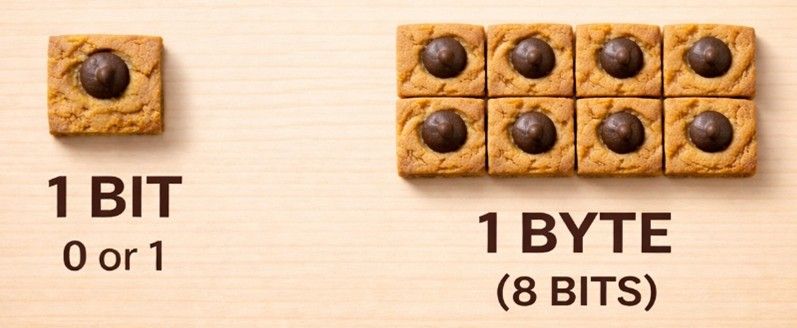
In computer language, one byte is typically required to make up one character in regular language, such as a letter, number, or symbol. This means 8 bits are needed to form a single character of text, and so bytes are the preferred unit to quantify data for memory and storage.
Byte for File Size
A byte is the basic unit for data storage, which is why file sizes on our computers or mobile devices are shown in multiples of bytes. Since modern data consists of high-quality text and images, file sizes are relatively big and often represented by kilobytes (KB), megabytes (MB), and gigabytes (GB).
Now that you’ve got the gist of how bits and bytes compare, consider learning about key internet terminologies.
Understanding internet jargon is essential to choosing the right plan.

Bits vs. Bytes — Key Differences
| Feature | Bit | Byte |
|---|---|---|
| Symbol (abbreviation) | Lowercase 'b' | Uppercase 'B' |
| Size | Smallest unit | 8 bits |
| Used For | Rate of data transfer (internet speed) | Memory and data storage |
| Example | 100 Mbps internet plan | 100 MB file size |
Why Internet Speed Is Measured in Bits
Internet speed can be measured in either bits or bytes, though the former is chosen because it is a telecom industry standard. Moreover, you get larger numbers when using bits rather than bytes, which look better from a marketing perspective.
Why Storage Is Measured in Bytes
Files are made of characters, and each character comprises a byte (8 bits), so it makes sense to use the larger unit. Additionally, storage devices like use byte as the standard unit, and operating systems of our computing devices display file sizes in bytes.
Digital Data Conversion Chart
- 1 Byte = 8 bits
- 1 KB = 1024 Bytes
- 1 MB = 1024 KB
- 1 GB = 1024 MB
Mbps vs. MBps
Differentiating between Mbps and MBps is usually the most confusing part, so here’s a clear breakdown:
- 1 Byte (B) = 8 bits (b)
- 1 Megabyte (MB) = 8 Megabits (Mb)
- Mbps = Megabits per second
- MBps = Megabytes per second
Example
If your current internet plan is giving 200 Mbps download speed, the amount of data transferred per second will be:
200 ÷ 8 = 25 MB
Conclusion: This means you can download a file of size 25 MB in one second (25 MBps) under ideal conditions. If you were to download a 1 GB file on the same network (200 Mbps), it would take 40 seconds.

Internet plans mention “up to” speeds for a reason
Advertised speeds are usually higher than actual speeds, which is why it takes longer to download or upload a file under real-world conditions.
Real-World Examples
Example 1
Buying 500 Mbps Internet:
If you're getting download speeds up to 500 Mbps, the maximum amount of data you can download per second is:
500 ÷ 8 = 62.5 MBps
Note: Since real-world internet speeds are affected by various factors like network congestion, the time it takes to download a 62.5 MB file will be relatively longer.
Example 2
Downloading 5 GB Movie:
File Size: 5 GB
5 x 1024 = 5120 MB
Download Speed: 500 Mbps
500 ÷ 8 = 62.5 MBps
Minimum Time Required for Download:
5120 ÷ 62.5 = 81.92 seconds
81.92 ÷ 60 = 1.37 minutes
Estimated Time: 1 minute and 22 seconds
Example 3
Uploading 100 MB File:
With traditional cable internet, upload speeds are generally much lower than download speeds.
Average upload speed against 500 Mbps download speed =
40 Mbps
40 ÷ 8 = 5 MBps
5/1 = 100/Total Time
Total Time = 100 ÷ 5
= 20 seconds
Quick Summary
A bit is the smallest unit of digital data, while a byte equals 8 bits. Internet speed is measured in multiples of bits (typically Mbps), while file storage and file sizes are measured in multiples of bytes (mostly MB and GB).
FAQs
How many bits are in a byte?
One byte consists of 8 bits.
Is internet speed measured in bits or bytes?
Internet speed is measured in bits because it is the smallest unit of digital data, which helps simplify data flow.
Bandwidth vs storage: What’s the difference?
Storage is the space on a server allocated for keeping data files, whereas bandwidth represents the amount of data that can be transferred from one server to another per unit time.
What is the difference between Mbps and MBps?
Mbps is short for megabits per second, which is used to represent internet speed. MBps is short for megabytes per second, which is a measure of data or file size that can be transferred per second.


