
Xfinity Internet Security: Full Guide to Features, Setup & Protection

Most internet service providers (ISPs) offer basic online security, which includes a network-level firewall and DNS filtering. However, Xfinity Internet security offers that and more when you opt for an xFi gateway.
What Is Xfinity Internet Security?
Modern homes are well-connected with more IoT devices than ever. While standard security features from your internet provider are fine, they are nowhere near enough to protect you from growing cyberthreats.
Many of us don’t realize that if a hacker gains access to a single device (such as a smart TV) on the home network, all our connected devices are at risk.
Here’s how you can protect your privacy from intruders:
Fortifying your home network may require a decent amount of effort and financial investment, but that’s where Xfinity Internet Security enters the chat.
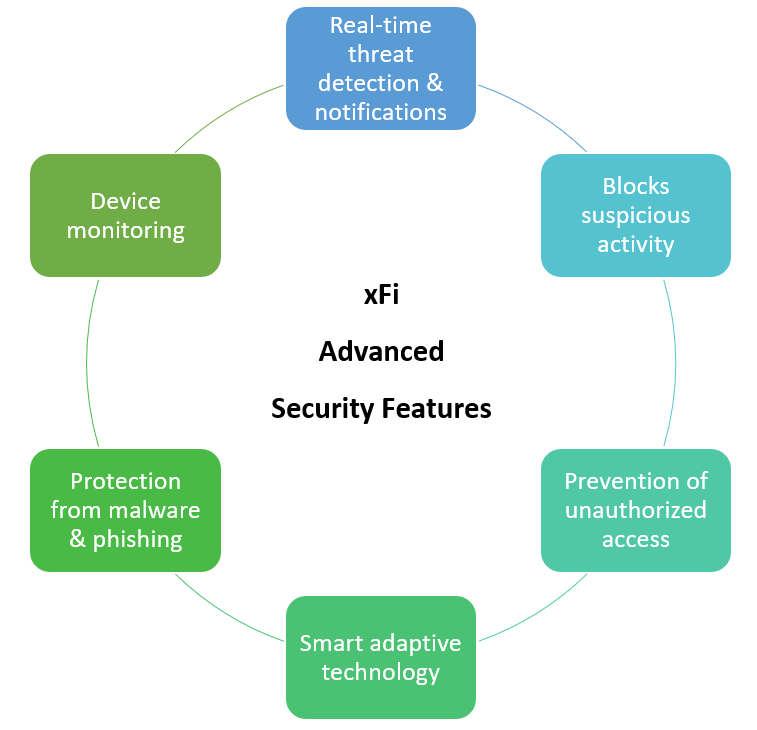
The xFi Advanced Security facility is an all-in-one package that provides a robust and personalized security solution for your home.
Xfinity Advanced Security Feature Breakdown
Is Xfinity Advanced Security Free?
The xFi advanced security is free for all Xfinity Internet subscribers who rent a compatible xFi gateway. While there is no extra cost for this service, it is not available to customers who are using their own equipment (modem and router) rather than leasing the advanced gateway device from Xfinity.
While xFi advanced security provides excellent protection for your home network, how do you stay safe on the go?
Subscribe to Xfinity xFi Complete for premium features, including wall-to-wall Wi-Fi coverage, free gateway upgrades, 24/7 customer support, and advanced security features both inside and outside the home.
How to Enable or Set Up Xfinity Internet Security
Xfinity advanced internet security is included with all xFi gateways except the Cisco DPC3939 model. You can easily enable it from the Xfinity app following these steps:
- Open the Xfinity app on your mobile device
- Select the Home tab
- Tap on Advanced Security and follow the instructions on the screen
The advanced security setup takes approximately ten minutes to reach completion.
How Xfinity Internet Security Works
After you have enabled Advanced Security in the Xfinity app, you can check its status in the overview section. You may access the dashboard by navigating to the Home tab and tapping on Advanced Security.
- The dashboard provides a summary of threats detected in the last seven days, as well as a list of affected devices on the network.
- Threats are divided into two categories: the first is for mere awareness, while the second requires attention.
- Awareness-only threats mainly involve visits to suspicious sites; you can check details of the potential risks and allow temporary access to these sites if necessary.
- Threats that need attention and action usually include unauthorized access attempts and suspicious device activity; you can check details and resolve issues by selecting Help Me Fix It.
- In case you think a website is safe and has been blocked by mistake, you may request a re-review at spa.xfinity.com.
Key Benefits of Xfinity Internet Security
Automatically blocks dangerous sites/online threats
Protects all connected devices – no need to install software on individual devices
Prevents hacking attempts and sends real-time alerts
Guarantees safer browsing for kids and families
User-friendly mobile app + dashboard to view and manage security risks
No additional cost or hardware – a compatible xFi gateway is all you need
Effectively detects and notifies of unusual or suspicious activity
Gets smarter over time through behavioral analysis
Device & Gateway Compatibility
It is important to note that third-party routers do not support xFi Advanced Security. Find the list of compatible devices below:
Troubleshooting Common Xfinity Security Issues
Here are some common issues users have encountered with Xfinity Advanced Security, along with potential solutions.
- Xfinity Advanced Security Not Working
Open the Xfinity mobile app and check your xFi gateway status. If it appears offline, there might be pending updates. Reboot your gateway device and wait for the updates to install. Moreover, make sure that you’re using the latest version of the Xfinity mobile app; using an outdated version might be the root cause. - Disable Xfinity Advanced Security
You can disable the Advanced Security feature through the Xfinity app. Select Advanced Security from the Home tab under Settings. A pop-up window with the option to disable the feature will appear. Bear in mind that disabling will stop risk monitoring and real-time reports. - Access a Website Blocked by Advanced Security
Xfinity Advanced security blocks potentially dangerous sites that can infect your device with viruses/malware. However, if you believe that a website is safe and has been blocked by mistake, you may request reassessment at spa.xfinity.com. The website will be re-reviewed and unblocked if your claims are correct. - Manage Xfinity xFi Alerts
Open your Xfinity app and tap the account icon on the bottom right. Next, find Account Settings and from there select Notification Settings; here you can choose your notification preferences and enable push notifications on your device. - Xfinity App Not Showing Threats
There is no fixed number for how many threats are detected on your network in a given time. You may receive multiple alerts in a day or nothing at all in the entire week, which isn’t unusual. If you’re concerned about missing notifications, you can check the status of all threats on the app anytime.
In case you are facing a different issue or cannot troubleshoot it on your own, you may visit the Online Support Center for answers or ask Xfinity Assistant.
Frequently Asked Questions
Is Xfinity Advanced Security worth it?
Yes, Xfinity Advanced Security is definitely worth your while if you’re already renting a compatible xFi gateway. You get premium network security features at no extra cost, which makes it a no-brainer.
Does Xfinity protect against malware?
Xfinity Advanced security protects your devices from malware by blocking risky websites.
Does Xfinity have a firewall?
The Xfinity xFi gateway comes with a built-in firewall, but the default setting is Low. You can change firewall settings from the gateway Admin Tool using the official guidelines.
How do I turn off Xfinity Advanced Security?
You can turn off Xfinity Advanced Security from the mobile app. Simply select Advanced Security on the Home tab to see a pop-up window.
Does Xfinity Advanced Security slow down the internet?
Xfinity Advanced Security has no direct impact on your internet speed. Slower speeds may occur due to network congestion during peak usage hours.
Is my home network safe with Xfinity?
All data transferred on your Xfinity Home Wi-Fi network is encrypted, so it is protected from wireless eavesdropping. However, xFi advanced security adds extra layers of protection to enhance online privacy.
Are Xfinity hotspots secure?
Open hotspots for public use a low protection level. On the other hand, Xfinity hotspots that are password-protected or have a lock symbol next to them are more secure.
Does Xfinity include parental controls?
Yes, you can set up parental controls for your home network from the Xfinity app or the Gateway Admin tool.
Table of content
- What Is Xfinity Internet Security?
- Xfinity Advanced Security Feature Breakdown
- Is Xfinity Advanced Security Free?
- How to Enable or Set Up Xfinity Internet Security
- How Xfinity Internet Security Works
- Key Benefits of Xfinity Internet Security
- Troubleshooting Common Xfinity Security Issues
- Frequently Asked Questions


